 Sudharsan Ananth
You can turn a Google News search into an RSS URL and read its updates in a feed reader. Replace the search page path with /rss/search, keep the query and edition parameters, then check the returned feed before subscribing. We tested search, phrase, locale, topic, and publisher-filter examples on October 29, 2026.
Use this for personal reading. The feed response limits use to a personal feed reader for personal, noncommercial purposes. For business monitoring, newsletter production, or republication, choose sources whose terms permit that use. The URL patterns below are observed behavior, not a documented Google RSS API contract.
This guide shows how to build a feed, inspect its results, and decide whether Google News is the right source for the job. The checks ran on October 29, 2026. They confirm that the tested URLs returned parseable RSS at that time. They do not establish complete coverage, delivery speed, or future availability.
Build a search feed
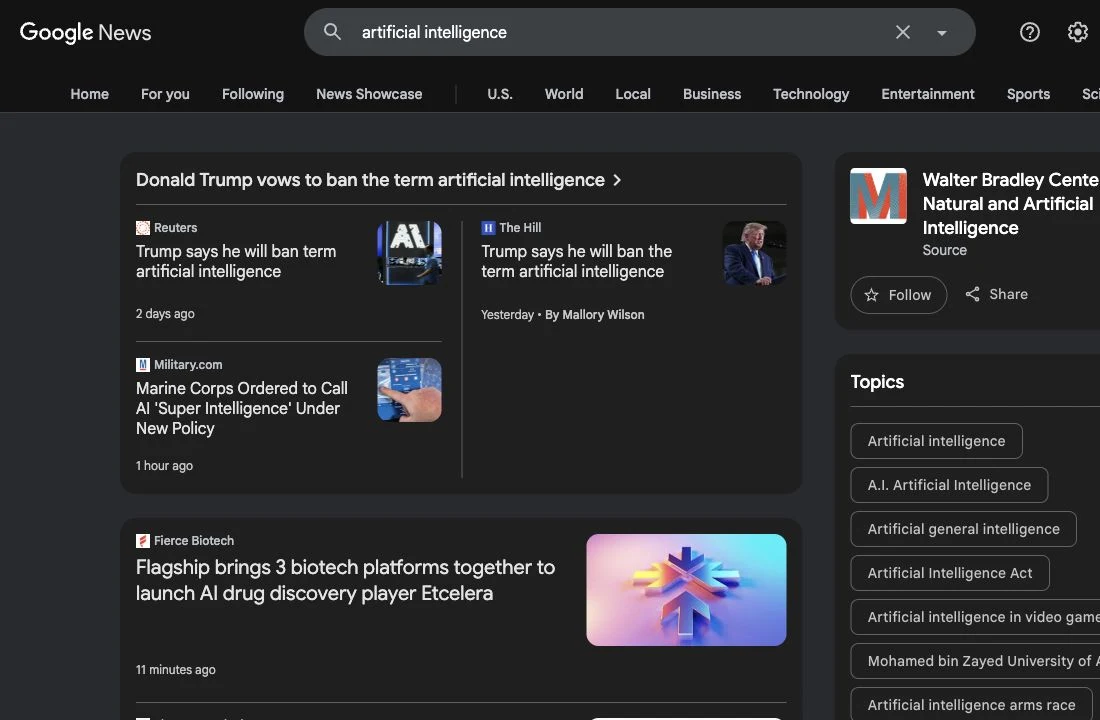
Start with a search query. Use words that describe the coverage you want, then add the edition settings for the country and language you want to read.
A search feed uses this URL shape:
https://news.google.com/rss/search?q=YOUR_QUERY&hl=LANGUAGE-COUNTRY&gl=COUNTRY&ceid=COUNTRY:LANGUAGEFor example, this URL searches for artificial intelligence in US English:
https://news.google.com/rss/search?q=artificial+intelligence&hl=en-US&gl=US&ceid=US:enThe parts after ? are query parameters. q holds the search terms. hl sets the interface language and region, gl sets the country, and ceid pairs a country with a language. These parameter names and combinations are widely used in observed URLs. Google does not document them as a public RSS contract.
When your search contains punctuation, spaces, or non-English text, encode it as a URL parameter instead of editing the URL by hand. In a browser, you can use an online URL encoder. In code, use a URL builder such as JavaScript’s URLSearchParams or Python’s urllib.parse.urlencode. This prevents a quote, ampersand, or accented character from breaking the query string.
For a quoted phrase, encode the quote marks in q. This example checks the phrase “climate change”:
https://news.google.com/rss/search?q=%22climate+change%22&hl=en-US&gl=US&ceid=US:enThe Google News interface supports searching for an exact phrase, words to include or exclude, a date range, and a publisher site. The official help page describes those controls in the interface. It does not promise that every interface operator behaves the same way in an RSS URL. Test each operator in the feed before depending on it.
Choose a country and language
Set the edition values for the people who will use the feed. A US English example uses hl=en-US, gl=US, and ceid=US:en. A Canada English example uses hl=en-CA, gl=CA, and ceid=CA:en.
Do not assume that changing one value changes all the others. Keep the country and language values consistent, then check the returned headlines and publishers. A feed can parse correctly and still show a mix that is wrong for your readers.
In the October 29 checks, the Canada English search for housing returned headlines from Canadian publishers. An India English search for semiconductors also returned results. Those are single observations, not a guarantee that the same terms will produce the same regional mix later.
Use a topic feed
Google News topic feeds use a different URL path from search feeds. A commonly observed pattern is:
https://news.google.com/rss/headlines/section/topic/TECHNOLOGY?hl=en-US&gl=US&ceid=US:enThe tested TECHNOLOGY URL returned RSS and redirected to a URL with an opaque topic identifier. Save the final URL only if you need it for debugging. Do not assume the identifier or redirect will remain stable.
A topic feed is a reasonable starting point when you want the headlines Google News groups under a named section. A search feed gives you more control over the words and restrictions in your query. In either case, review the stories before you rely on the feed. A topic label does not mean every item will fit your editorial definition of that topic.
Check the feed before you subscribe
Open the URL in a browser. A raw XML page is expected. Look for item titles, publication names, dates, and links. If the browser downloads a file instead, open it in a text editor or add it to a reader to inspect the entries.
The response can be valid RSS even when it has no matching stories. The deliberately narrow test query "zzqvprx-20261029-nevermatch" returned HTTP 200 and parsed as RSS, with zero items. That is a useful distinction: an empty feed does not necessarily mean the URL is malformed.
Use this short review before adding the feed:
- Do the titles match the subject you meant to follow?
- Are the publication names sources you want to read?
- Does the edition match your audience’s region and language?
- Does the XML contain entries, or is it valid but empty?
- Do the article links take you to the publisher’s story?
The checks found a Google News RSS result whose title ended with “Reuters” and whose item link began with a Google News URL. Feed items can use Google News links, so open a sample and follow it to the publisher before treating the displayed title as enough context. Read the original article and check its date, author, and evidence.
Add the URL to a feed reader
Copy the complete URL, including every query parameter. In your RSS reader, add a feed by URL and paste it into the reader’s add-source field. If the reader rejects the URL, first open it in a browser and confirm that it returns XML. Then try the final URL after redirects, if the reader reports one.
After the reader fetches the source, give it a name that describes the query and edition, such as Climate change phrase · US English. Keep the query itself in the name if you have several similar feeds. That makes it easier to spot overlapping searches and revise the right one later.
Compare a story with direct feeds from publishers you trust, remove duplicate coverage, and follow the original link when a story matters. To add the URL in Sparkfeed, use a signed-in account. The public demo is read-only, and the add-feed flow was not tested for this article.
If a website publishes its own feed, a direct subscription is usually the clearer choice for following that publisher. For sites without a published feed, see Website to RSS: follow sites without a feed. For tracking a set of competing companies, see how to build a competitive intelligence feed.
Refine the query without losing track of it
Start with one query and change one part at a time. If the result set is too broad, narrow the words or test an exact phrase. If the feed covers the wrong region, check hl, gl, and ceid together. If you want a named publisher, test a source restriction and inspect the publisher names in the results.
The check for climate source:bbc.com returned 33 items, and the first title named BBC. That is evidence that the restriction affected this one feed response. It is not proof that the syntax is officially supported, that all results came from that publisher, or that the same query will keep working. Verify the source of each item you plan to use.
Avoid putting several changes into one new URL. If you change the phrase, source, and locale at once, it becomes harder to know what fixed the results. Keep a note of the working query and date if the feed supports an ongoing research task.
Fix common problems
The feed has no items. Confirm the URL starts with https://news.google.com/rss/ and that q contains the intended words. Remove a restriction, broaden a rare phrase, or change the edition. A valid empty RSS response is possible.
The feed shows the wrong language or region. Check all three edition values. Set hl for the language and region, gl for the country, and ceid for the country-language pair. Then check actual results rather than relying on the parameter names alone.
A reader says it cannot find a feed. Open the URL directly. If you see XML with an <rss> root and <item> entries, the endpoint parsed as RSS in that browser check. Paste the full URL into the reader, including ceid. Some readers may handle redirects differently, so try the final URL if the reader exposes it.
The feed repeats the same story across sources. Google News can surface coverage of one event from several publishers. Keep the feed for discovery, then compare article links and dates before saving a story. A second feed from a trusted publisher may help you separate that publisher’s reporting from the wider coverage.
A query stops returning the same mix. Reopen the URL and inspect its response. These RSS URL patterns are not a documented, versioned interface. Change the query or return to Google News search to build a fresh one.
Pick the right source for the job
| Need | Start with | Why |
|---|---|---|
| Follow one publisher’s articles | The publisher’s own RSS feed | You are subscribing to that site’s published items directly. |
| Scan coverage across publishers for a topic | A Google News search or topic feed | One feed can bring together stories that match the query or topic. Check the original sources. |
| Follow a specific query by email | Google Alerts | Google’s help describes email alerts for new matching Google Search results and lets you adjust frequency, language, region, and result count. |
| Detect a change on a page without a feed | A website monitoring tool | It checks page changes rather than aggregating news stories. |
Google News RSS and Google Alerts solve adjacent but different tasks. The Google Alerts documentation describes email notifications when new matching results appear in Google Search. This guide covers a feed URL that a reader can poll. If you need email alerts, set them up separately with Google Alerts.
If you need to notice a change to one specific webpage, an RSS search feed may not be precise enough. Use a page monitor or see how to monitor competitor website changes. Do not use Google News RSS for a newsletter workflow. The newsletter curation guide covers the editorial process with sources whose terms permit that use.
Sources and further reading
- Find what you want on Google News, Google News Help. Documents search and filtering in the Google News interface. It does not specify the RSS URL format.
- Create an alert, Google Search Help. Documents email alerts for new results in Google Search.
- Google News transitions to automatically-generated publication pages, Google News Publisher Center Help. This concerns publisher submissions through Publisher Center, not subscribing to a user-created Google News RSS URL.
- Google Feedfetcher, Google Crawling documentation. Describes Google’s crawler for RSS and Atom feeds; it does not document the Google News RSS endpoint.
- Google News RSS search parameters: the missing documentation, NewsCatcher. Independent analysis of observed URL behavior, not an official Google specification.
The URL checks in this guide are first-hand observations from October 29, 2026. The feed response included the use notice described at the start of this guide. Check the current notice before use. Counts and titles are snapshots.
Frequently asked questions
01Does Google News still provide RSS feeds?
The tested search and topic URLs returned parseable RSS on October 29, 2026. Google does not publish a public specification for these URL patterns, so test a feed before relying on it and expect the behavior to change.
02Is a Google News RSS feed free?
The tested URLs were accessible without a paid feed-generation service. The XML response states that the feed is for personal, noncommercial use and prohibits other use. Check the current notice and each publisher’s terms before using the feed or article content.
03Can I track an exact phrase?
A quoted phrase returned RSS in the test. Google News Help documents exact-phrase search in its interface, but does not document equivalent RSS syntax. Check the returned headlines to confirm that the phrase is useful in your feed.
04Does the feed include full articles?
Do not assume that it does. A feed entry is for discovery. Open the publisher link to read the story, and follow the publisher’s access rules. RSS does not remove a paywall.
05What is the difference between Google News RSS and Google Alerts?
Google News RSS gives a reader a URL to poll for feed entries for personal, noncommercial reading. Google Alerts sends email when Google Search finds new results that match an alert. Choose based on whether you want a reader source or email notifications, and review the terms for your intended use.
06Why is my Google News feed empty?
The query may be too narrow, the edition may not fit the subject, or no matching result may be available at the time you check. The test for a deliberately invented phrase returned valid RSS with no items. Broaden the query, remove restrictions, and check again.