


SparkFeed

RSS reader

Your sources.
One place
to read.

Sparkfeed is an online RSS reader for blogs, news, and publications. Follow feeds, organize sources into folders, and save articles to read again.
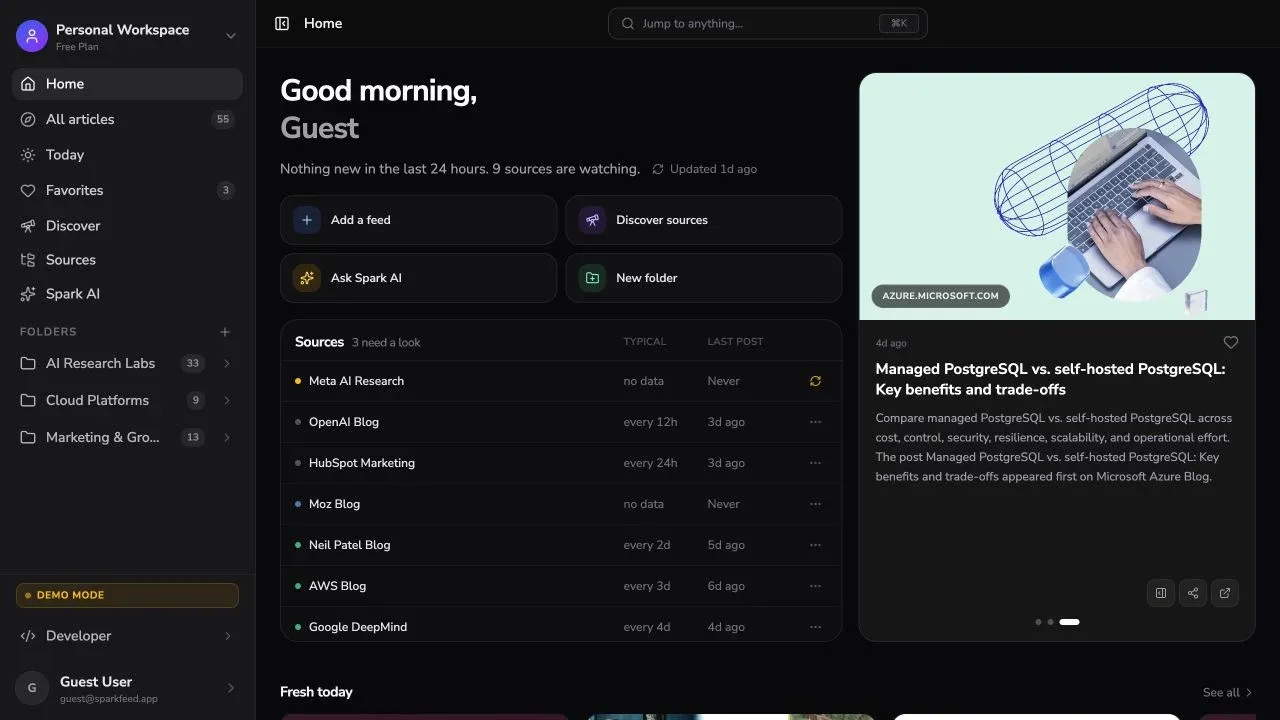
Sparkfeed reader with source folders and recent articles

Read updates from the sources you choose.

Follow your preferred publications. Group related feeds.
Read the articles that interest you.

Paper fragments gathering into an open book

Many sources.
One reading space.

Follow RSS feeds from publications, independent writers, and company blogs. Read their published articles in one collection.

PublicationsBlogs

Organize your feeds.
Focus on one topic.

Group related feeds into folders. Keep work research separate from personal reading, then open the collection you want to review.

A blue architectural opening framing a warm sun

Read an article.
Keep the source in view.

Open an article in the reader. Follow its source link to read on the publisher’s website when you need the original context.

Explore the reader

Keep track of what you want to read.

Source names, folders, and Favorites support your reading routine.

Know the source

See the publication name alongside each article.

Save to Favorites

Mark an article as a favorite so you can return to it later.

Browse a folder

Open a folder to read articles from related sources.

Visit the source

Open the original article on the publisher’s website.

Start with your favorite sources

Make room for
better reading.

Explore the online reader, then add the sources you want to follow. Organize your feeds and start reading.

01What is an RSS reader?
An RSS reader collects published articles from the feeds you follow. Sparkfeed lets you read those updates in your browser, organize sources into folders, and save articles to Favorites.
02Which sources can I follow?
Follow RSS or Atom feeds from blogs, news sites, and other publications. For websites without a feed, support depends on the site. Add the source and check that the articles you expect appear.
03Can I organize my RSS feeds into folders?
Yes. Create folders and group related sources by topic or project. Open a folder when you want to read updates from that group.
04Can I move feeds from another RSS reader?
You can add feed URLs from your existing subscriptions, including several URLs at once. Keep your current subscription list as a reference and check the sources before moving your full collection.
05How do I start using Sparkfeed?
Create an account, add a few supported sources, and organize them into folders. Open an article to start reading. You can explore the live demo before signing up. Explore the live demo.