



What is a newsletter curation workflow?
Newsletter curation means choosing useful stories for a specific audience, checking the originals, and explaining why each link is worth reading. A repeatable workflow starts with a small source collection and ends with a verified shortlist, your commentary, and an issue ready for your email platform.
Newsletter writers do not need a larger pile of links. They need a reliable path from source to decision. This guide lays out that path for a solo writer or a small editorial team. It assumes the email is assembled and sent in a separate publishing platform. The research workspace holds sources and article candidates, while the ledger preserves the editorial record.
Why does newsletter curation need a process?
A process protects the reader’s attention and the writer’s credibility. Without one, the same announcement can arrive through several feeds, a headline can stand in for an article nobody has read, and a useful link can lose its context by the time the issue is assembled.
The goal is not to remove editorial judgment. It is to give judgment a consistent place to happen. The Society of Professional Journalists Code of Ethics advises writers to verify information, use original sources where possible, provide context, and correct information throughout a story’s life. Those principles fit a curated newsletter even when the newsletter is not a newsroom.
A good workflow answers five questions for every candidate:
- Why does this belong in this issue?
- Where is the original source?
- What did the writer actually read?
- Is this a new story, a follow-up, or a duplicate?
- What should a reader understand after following the link?
The answer to each question should be easy to find before the item reaches the email editor.
What are the steps in a repeatable newsletter curation workflow?
The core steps are to define the issue, choose sources, collect candidates, shortlist, read the originals, check for duplicate coverage, record the item in a ledger, add commentary, and hand off the finished set. The diagram below is an illustrative process, not an automated publishing promise.
The sequence matters. Shortlisting before deep reading protects time, while reading before writing prevents commentary based on a headline or a secondhand summary. The final handoff should contain enough information for another person to assemble the issue without reopening the entire research session.
1. Define the newsletter brief before opening feeds
Start each issue with a one-sentence brief that names the audience, topic boundary, time window, and editorial promise. A brief such as “three useful developments for independent shop owners this week” gives the writer a filter. “Find interesting things about small businesses” does not.
Add a small inclusion rule and an exclusion rule. For example, include primary announcements, useful technical explainers, and reporting with a clear consequence for the audience. Exclude repeated press-release rewrites, vague trend pieces, and items that require a claim the writer cannot verify.
Keep the brief visible during research. A candidate can be excellent and still be wrong for this issue. Save it for a later edition if it does not answer the brief.
2. Select sources that match the promise
Source selection matters because it shapes what you see and what you miss. Begin with first-party sources, specialist publications, research organizations, and subject-matter writers whose work you can evaluate. Add discovery sources only when you know what they are good at and what they tend to miss.
RSS and Atom are useful collection formats because they expose an ordered stream of entries and metadata. The RSS 2.0 specification describes RSS as a web content syndication format organized around a channel and its items. RFC 4287 defines Atom as an XML format for syndicating web content and gives entries stable identifiers, links, authors, dates, and other metadata.
Use a source map with four fields: source name, URL, reason for inclusion, and limitation. A source map keeps the collection intentional.
| Source type | Useful signal | What to record as a limitation |
|---|---|---|
| First-party newsroom or blog | Announcements, launches, explanations | The publisher controls the framing |
| Documentation or changelog | Product behavior and technical changes | Docs can lag a shipped change |
| Specialist publication | Reporting, analysis, and domain context | Editorial angle and access vary |
| Research or public institution | Methods, findings, and source material | Publication cycles can be slow |
| Public listing or event page | Calls, dates, programs, and opportunities | A listing can change without notice |
Group sources by subject or editorial beat. In Sparkfeed, folders group sources, which makes the source map visible without pretending that a folder is an editorial ledger or a security boundary. Favorites are for shortlisted articles, so the source library and the issue queue stay conceptually separate.
3. Collect candidates into a working queue
Collect enough material to compare candidates, but keep the queue bounded by the brief. A feed reader can combine RSS and Atom feeds with supported public pages that do not publish a feed. When a page has no RSS or Atom endpoint, add its public URL only when the collection method and site permissions are appropriate. A no-RSS page is a source to review, not evidence that every page on the web can be monitored reliably.
Use a consistent candidate record as soon as an item enters the queue:
- Headline and original article URL
- Publisher and author, when available
- Published or updated date
- Source group or beat
- One sentence on why it might fit the issue
- Status such as candidate, shortlisted, held, rejected, or ready
Do not treat a feed item’s excerpt as the finished article. It is a discovery signal. The AP guidance on telling a story says information from the internet should be vetted and attributed to its original source. That is a useful standard for curation: the feed finds the item, while the original page supplies the material the writer evaluates.
4. Shortlist with an explicit reader test
Shortlisting is a decision, not a softer form of collecting. Ask whether the candidate gives the reader a fact, explanation, useful tool, meaningful change, or well-supported point of view that fits the issue promise.
Write a provisional reason next to each shortlisted article. “This explains a new delivery option for small shops” is stronger than “interesting.” The reason can change after reading, but forcing a sentence early exposes weak fits quickly.
Keep Favorites for the shortlist. Keep source folders stable across issues. This lets a writer return to a source library without confusing it with an issue that is already in progress. Treat your Favorites as a personal shortlist, not an approval queue for the team. Put shared selections and publication decisions in the issue document, where collaborators can review them.
5. Read the original article, not only the feed item
Reading the original is the point at which curation becomes editorial work. Open the original page and check its title, author, date, update note, evidence, links, qualifications, and conclusion. Look for the sentence that changes the meaning of the headline. Look for what the article does not establish.
Separate three things in your notes:
- Observation: what the source explicitly says.
- Interpretation: what you think it means for this audience.
- Commentary: why the reader should care or what to try next.
For an illustrative example, a courier announces a weekend delivery service. The observation is the announced service and its conditions. Your commentary might explain why a shop owner should check whether their postcode and parcel size qualify. You would still need evidence before saying that the service saves money or improves customer satisfaction.
Keep quotations short and link to the source. A curated newsletter should help readers reach the original, not replace it with a long pasted excerpt. If the page is unavailable, says it is updated, or conflicts with another primary source, mark the uncertainty in the ledger and decide whether the item belongs in the issue.
6. Check for duplicate stories and meaningful follow-ups
Duplicate checking prevents an issue from spending several slots on one announcement. Compare the candidate’s entity, event, claim, and time window with the items already shortlisted. Two links are duplicates when they point to the same underlying development and add no distinct reporting or useful context.
Keep both links when the second source contributes something materially different, such as an independent investigation, a technical implementation detail, or a response from an affected group. Label the relationship as follow-up, primary source, context, or duplicate. Do not let a different headline disguise the same story.
Atom’s stable entry identifier is helpful for identifying the same feed entry when entries are aggregated. It is not a complete editorial duplicate detector. A publisher can republish a story under a new URL, and two independent publishers can cover the same event. That is why the human check belongs after collection and before commentary.
7. Keep the source ledger in a separate document
The source ledger is the durable editorial record for an issue. Keep it separate from folders and article favorites because the ledger tracks decisions and evidence, while those product controls organize sources and candidates.
Use one row per candidate, including rejected items when the rejection teaches the team something. A practical ledger has these columns:
| Field | What it answers |
|---|---|
| Issue and review date | Which edition and review cycle? |
| Article title and original URL | What should the reader open? |
| Publisher and author | Who produced the source? |
| Source type | First-party, specialist, research, or other? |
| Fit decision | Why is it in or out? |
| Original read status | Did the writer inspect the source? |
| Duplicate status | New story, duplicate, or follow-up? |
| Evidence note | What does the source actually establish? |
| Commentary angle | What value does the newsletter add? |
| Attribution and rights note | What needs to be credited or linked? |
| Final status | Held, ready, rejected, or published? |
The ledger makes handoff safer. An editor can see whether an item was read, why it was selected, and what language still needs checking. It also makes corrections possible after publication because the team can recover the source, date, and wording used at the time.
8. Add commentary that gives the link a reason to exist
Commentary should orient the reader in a few sentences. State what happened, identify the original source, explain why it matters to this audience, and give the reader a question or action to carry forward. Avoid saying that a source “proves” a conclusion when it only reports an event.
Use a repeatable item shape:
What happened. One sentence grounded in the original.
Why it matters. One sentence connected to the issue audience.
Read this for. One detail, caveat, method, or question that rewards opening the link.
This structure leaves room for a point of view without hiding the source. If the item is sponsored, affiliated, or selected because of a relationship, disclose that context according to the newsletter’s policy.
9. Hand off a clean package to the email publishing platform
The handoff is complete when the email editor has the approved item list, original links, commentary, attribution notes, subject-line direction, preview text, and any open questions. The research tool does not need to send the email. It needs to make the editorial package easy to transfer into the chosen publishing platform.
Before handoff, run the story checks below. They are illustrative and intentionally human-led.
At the publishing stage, check every link in the rendered email, confirm that the headline and commentary match the linked page, and preview on the platforms your team supports. Keep the final approval and sending settings in the publishing platform your team already uses.
What does a weekly curation routine look like?
Use separate collection and selection sessions so that every interesting link does not interrupt the issue you are writing. The following is an illustrative routine for a weekly newsletter about independent businesses. It is a suggested schedule, not a tested time-saving claim.
| Stage | Writer’s task | Result |
|---|---|---|
| Early in the week | Review the issue promise and scan source folders | A small candidate list in the issue document |
| Before drafting | Open original pages, compare repeated stories, and check dates | A verified shortlist with reasons for inclusion |
| Drafting session | Write the context and original commentary | An issue draft with source links |
| Before sending | Review the email preview and every destination link | A final editorial approval in the publishing tool |
| After sending | Record corrections and reader questions | Leads and improvements for the next issue |
For example, the issue document could hold one public company announcement, one independent interview, and one practical resource. The number is an editorial choice, not a rule. If only two links meet the promise that week, send two good recommendations instead of filling a slot with a weak one.
How can Sparkfeed support this research workflow?
Sparkfeed gives newsletter writers one research workspace for RSS and Atom feeds, supported public pages without feeds, source folders, Favorites, search, and source health. A writer can keep a stable folder library, move promising articles into Favorites, inspect article details, and prepare the material for a separate email publishing workflow.
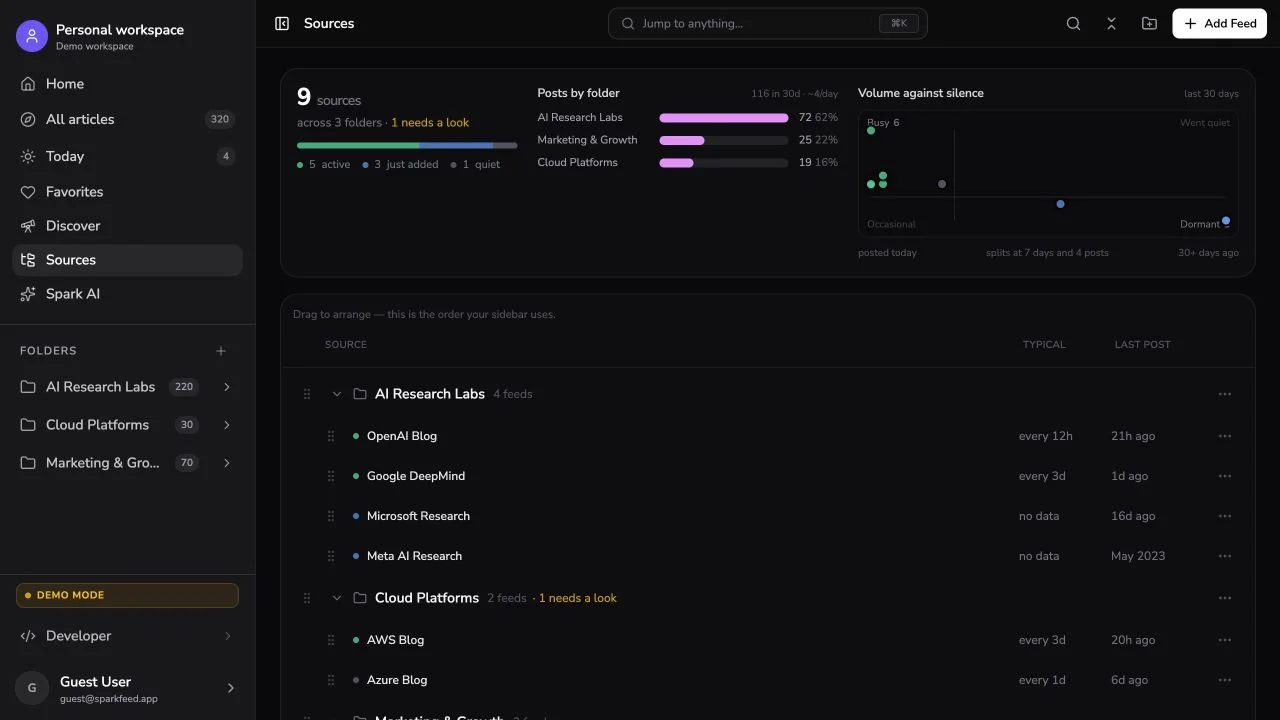
The product supports the collection and review stages. It does not decide what deserves publication, replace the source ledger, write the final issue, or send the newsletter. Spark AI is optional and its output needs human verification. A hosted workspace uses configured cloud providers, while a Community Edition operator configures providers for that installation. Treat any AI suggestion as a starting point for checking the original.
For the wider research setup, see the guide to a competitive intelligence feed. If you need to bring a public page into a reading workflow, see how to follow a website without a feed. Writers comparing private research tools can also read Feedly alternatives and privacy, and the article-idea workflow shows how a source can lead to an original story rather than a roundup entry.
Start with one topic folder and a few sources. Explore the demo to inspect the reading interface, or create a free research workspace. Keep your existing email publisher for sending the finished issue.
Sources and further reading
- RSS Advisory Board: RSS 2.0 Specification
- RFC Editor: The Atom Syndication Format, RFC 4287
- Associated Press: Telling the Story
- Society of Professional Journalists: Code of Ethics
- Sparkfeed documentation
Frequently Asked Questions
What is the best way to curate content for a newsletter?
Start with a specific audience and issue brief, then collect from a small source set and read the original page for every shortlisted item. Record the source, fit, duplicate status, and commentary angle in a separate ledger before handoff.
How many articles should a curated newsletter include?
There is no universal number. Choose the smallest set that fulfills the issue promise and gives each item enough context. A short, well-edited issue is easier to read and easier for the writer to verify than a long link dump.
How do you avoid duplicate stories in a newsletter?
Compare each candidate with the shortlist by event, claim, entity, and time window. Keep a second link only when it adds independent reporting, meaningful context, or a primary source, and label the relationship in the ledger.
Should newsletter writers summarize the articles they curate?
Writers should add a short, accurate explanation of what happened and why it matters to the audience. Link to the original, keep quotations brief, and distinguish the source’s claims from the writer’s interpretation and commentary.
What belongs in a newsletter source ledger?
Record the issue date, original URL, publisher, author, source type, fit decision, original-read status, duplicate status, evidence note, commentary angle, attribution note, and final status. The ledger is separate from a source folder or article Favorite because it records editorial reasoning.
Can a feed reader send a finished newsletter?
A feed reader can support source collection, review, and editorial handoff, but the email should be assembled and sent in the publishing platform your team has chosen. Keep the source ledger and final approval step with the editorial workflow so the sender can check links, attribution, subject lines, and opt-out requirements.
